Showing posts with label motorola. Show all posts

Sunday, July 31, 2016

Huawei P9 vs. P8 Mobile review: Good improvement for the latest device

With a DxOMark Mobile score of 80, the Huawei P9’s dual 12Mp RGB and monochrome sensors provide solid results. Our tests showed a nice improvement over its predecessor, the P8, which scored 74 overall, with the P9 offering improved autofocus and more consistent exposure and color results. The P9’s sub-scores of 84 points for photo and 72 for video demonstrate Huawei’s latest device is particularly strong for still photography.
Huawei P9 vs. Huawei P8
Images are mostly well-exposed across all lighting conditions, with good and repeatable white balance results that show an improvement over the P8. The P9’s dual-LED flash unit also facilitates good target exposures, with very low noise in the center of the frame when using flash.
Huawei P9 (left) and P8 (right) exposure
Both the Huawei P9 (left) and P8 (right) produce mostly well-exposed images in many situations and lighting conditions, with vivid and pleasant color rendering.

Outdoor pictures boast good detail and more neutral color

Shooting outdoors and in bright light conditions, the P9 delivers mostly well-exposed images, with vivid and pleasant color rendering. It does, however, have a tendency to slightly under-expose outdoor shots, which can lead to a loss of detail in darker areas.
For many users this won’t be a significant problem, as exposures remain pleasant, but photographers after a full range of tones should consider some post-production lighting of the shadow regions. The consistency of the P9’s HDR has been improved compared to the P8, too. Consecutive HDR exposures on the P9 still display some inconsistency, making it advisable to shoot multiple frames when shooting high-contrast scenes, so you can pick out the best exposure.
The P9’s white balance is mainly accurate and repeatable when shooting outdoors, and despite some minor failures, it offers more neutral results (i.e., a less obvious pink cast) compared to the P8. Detail preservation is also very good on the P9, making it a good choice for shooting intricate outdoor scenes. Only very minor luminance noise is visible, with much less chromatic noise compared to outdoor shots on the P8.
TIP: When shooting hig- contrast scenes, capture multiple exposures of the same view so you can pick out the shot with the best exposure and greatest dynamic range.
Under-exposure on the P9 can result in a loss of detail
Under-exposure on the P9 can result in a loss of detail, although most users will find the exposures acceptable.
P9 and P8 Consecutive HDR
Consecutive HDR exposures with the P9 (top) can be a little inconsistent. But images with the P8 (bottom) show a greater difference in the dynamic range recorded.
hdr_exposures
White balance on the P9 (left) is more neutral however, with the P8 (right) display a pink colorcast in the centre, shifting towards green in the corners.
Outdoor exposures from the P9 and P8.
Outdoor exposures from the P9 (left) display the same level of detail, but with less chromatic noise compared to shots from the P8 (right).

Indoor photos are exploitable even in extreme low-light conditions

In low-light pictures (5 to 20 Lux), the P9’s improved color rendering persists with saturated color compared to the P8. Indoor shots remain mostly well-exposed, too, and even in extreme low-light of 5 Lux, images remain usable from both the P8 and P9.
Between 5 and 20 Lux, fine details are reduced as the P9 utilizes high ISO sensitivities up to ISO 3200, and a slow 1/17s shutter speed to maintain exposure. Cleaner and sharper indoor results are possible with stronger light sources. Using a 500 Lux light source, exposure settings of ISO 160 and 1/50s shutter speed capture more well-defined detail.

Tip: When capturing pictures in low-light environments, seek out areas with the best light sources to allow the P9 to use faster shutter speeds and lower ISO sensitivities for sharper and more detailed results. In extreme low light, supporting the device as much as possible will help reduce camera shake.

Moto Z Force Droid Mobile review


DxOMark Mobile
87

Overview

The Moto Z Force Droid also offers consistently good performance across both stills and video, achieving a Photo sub-score of 87 and Video sub-score of 86, with the overall result weighted in favor of the Photo score. Exposures are generally very good across a range of different lighting conditions, including good dynamic range; well-balanced, high-contrast exposures, thanks to its Auto HDR mode; and pleasant color with neutral white balance. The high-resolution sensor also enables 4K video capture, with movies continuing to offer excellent levels of detail, particularly in bright light. Exposure and stabilization are also strong points, with the Moto Z Force Droid rendering both pleasant and smooth videos.
Moto Z Force Droid
The Moto Z Force Droid’s high-resolution 21Mp sensor captures nice exposures with strong, bold color and some of the best detail preservation we’ve seen for smartphones.

Outdoor pictures with superb detail and minimal noise

Shooting outdoors and in bright light conditions, the Moto Z Force Droid produced an excellent set of test images, with good exposure, neutral white balance, excellent detail with well-controlled noise, and vivid color. When triggered, the built-in Auto HDR proved very successful. In tricky high-contrast scenes, skies were well exposed, with good highlight detail; and despite slightly clipped shadows, the overall exposure was very pleasing. On overcast days, HDR exposures were excellent, too, with detail in the sky and excellent processing in the darker areas, ensuring good detail with very little visible noise or color shading.
We observed the odd exposure failure in very bright scenes, with some over exposure and blown-out highlights, but such failure was a rare occurrence. The Moto Z Force Droid’s 21Mp sensor captures outstanding levels of fine detail — in fact, some of the most intricate results we’ve seen from a smartphone.
In bright light conditions, very fine details, such as the mesh on the air vents, shows the extent of the resolution possible, with almost no moirĂ© visible in these high-frequency patterns. Outdoors, noise reduction is very good, too. In blocks of uniform color, such as the blue sky, a fine luminance noise is just visible, but it’s not offensive and is not visible at all in more intricate areas of the picture. Good white balance ensures natural results, with bold, well-saturated color; and although we observerd some exposure and white balance irregularities, the degree of variation between results was well within acceptable parameters.
Auto HDR
On bright days, Auto HDR mode does an excellent job of maintaining highlight details, and while some of the blacks are clipped, the exposure remains very pleasant overall.
HDR
On a more overcast day, we recorded high levels of shadow detail under the bridge with no visible color shading or noise; excellent detail in the tower and bridge is also evident.
Over-exposed scene
We recorded some exposure failures, including this over-exposed scene, but this was an infrequent occurrence with the Moto Z Force Droid.

Great indoor photos even in extreme low light

Indoors, the Moto Z Force Droid’s f/1.8 lens aperture and Optical Image Stabilization (OIS) help produce some very successful low-light results. In extreme low light (5 Lux), images are a little under-exposed, but far from the worst we’ve seen, remaining very usable with nice (if not bold) color. Even in extreme low light, the bright lens aperture and OIS allow the Moto Z Force Droid to use exposure settings that help maintain better image quality. The maximum ISO sensitivity employed was a fairly low ISO 2000, compared to ISO 3200, which is often used. You should still expect some loss of fine detail in low light conditions, but results are very commendable nonetheless.
The Moto Z Force Droid also uses a fairly slow 1/10 shutter speed, but thanks to the OIS system, using good technique when shooting hand-held make sharp results possible. Under brighter 10 and 20 Lux light sources, the shutter speed remains at 1/10 sec, but the Moto Z Force Droid uses lower ISO sensitivities for both cleaner and more detailed low-light pictures. At 100 and 500 Lux, both a lower ISO setting and a faster 1/30 sec shutter speed ensure the excellent sharp, detailed, well-exposed shots we saw during outdoor testing.
We observed some slight irregularities in noise, exposure, detail, and color when taking consecutive low light shots, but the variation wasn’t overly concerning, and we often achieved good results. 
5 Lux light
Under an extreme lo- light 5 Lux light source, images are a little under-exposed, but still usable; and the f/1.8 lens and OIS system help reduce noise and produce sharper results.
100 Lux light
Exposures are brighter under a 100 Lux light source, with better color; a low ISO 640 sensitivity and 1/30 sec shutter speed ensures sharp images with virtually no visible noise.

Details: Explaining the scores

Photo spider

Exposure and Contrast (89)

One of its best category scores, the Moto Z Force Droid produces well-exposed images in all conditions with very few failures. HDR exposures in both bright and overcast conditions are very successful, recording good highlight detail in most cases, and good shadow detail with no visible color shading or excessive noise. Indoor exposures are excellent, too, thanks to the f/1.8 lens ensuring bright exposures with low ISO sensitivities even in extreme lowlight, and the OIS system helps achieve sharp shots even when using slow shutter speeds.
HDR
Successful HDR exposures render a full range of tones, with good shadow detail that displays no visible color shading and little visible noise in areas with high levels of detail.

Color (83)

The Moto Z Force Droid achieves a very acceptable score of 83 for color, thanks to accurate white balance, vivid hues, and barely-visible color shading in outdoor shots. Some color shading is visible under extreme low-light tungsten light sources, with a pink cast in the center shifting to green at the edges.
White balance
Neutral white balance on outdoor exposures display accurate color with pleasant hues and no signs of color shading.

Autofocus (91)

An outstanding result for autofocus means that you can be assured of fast and reliable focusing in most conditions when shooting stills or videos with the Moto Z Force Droid. Autofocus is both accurate and repeatable in all conditions, and although video focus is a little slower in low light to converge as you change scenes, it remains very acceptable. 

Texture (88) and Noise (88)

Producing some of the most detailed smartphone pictures we’ve seen, the Moto Z Force Droid’s 21Mp sensor does an excellent job of maintaining detail while minimizing noise. Very intricate details are preserved in bright light, and only a fine luminance noise is visible in blocks of uniform color. In low light, the results were a little more inconsistent, but with good handling and capture technique, both sharp and nicely textured images with acceptable levels of noise were achievable. A sequence of images captured in low light using continuous burst mode displayed significantly more noise and less detail, so this feature is probably best avoided.

Tuesday, May 10, 2016

Motorola Moto G Plus Mobile review: a very capable camera


8
DxOMark Mobile
84

Overview

With encouraging photography results for a mid-range smartphone, the Motorola Moto G Plus boasts a very respectable DxOMark Mobile overall score of 84 points. Offering a 16Mp 1/2.4”-type sensor for high-quality images, together with a good array of additional photo features, Motorola is positioning its latest device for mass market appeal.
Our industry standard mobile tests analyze image quality of both still photos and video footage to determine individual photo and video sub-scores for each device, with the still photo scores weighted a bit higher than the video. Both sub-scores evaluate image quality across a range of categories, such as exposure and color; the Moto G Plus fares slightly better for still photos with a photo sub-score of 85 points compared to 81 for video.
Boasting consistently high photo scores in the mids 80’s for most categories, the Moto G Plus achieves a very good score for autofocus, which is fast and accurate in all conditions. Minor drawbacks, such as some loss of shadow detail, a slight blue colorcast, and HDR mode irregularities were observed, but overall, Motorola’s latest device impressed.
Video scores hover around the low to mid 80’s, with the best results for noise and exposure. The video module demonstrates good stabilization and autofocus in all lighting conditions, making successful indoor and outdoor movies possible. Video color and white balance are pleasant in all conditions, too, with noise reduction particularly successful outdoors. In low light, some video detail is lost due to visible luminance noise, with occasional autofocus inaccuracies recorded, too, but these are minor blips in an otherwise successful video performance.

Great HDR outdoor shots (when activated…)

Outdoors, the Moto G Plus generally delivers good target exposures, as well as vivid and pleasant color, with very little color shading visible in shadow regions. Slight white balance inaccuracies do occasionally occur, with a slight blue cast visible, but it’s not very offensive and color remains strong. Where the Moto G Plus excels in bright light is detail preservation, with well-controlled noise reduction resulting in smooth but nicely detailed files.
The Moto G Plus also offers a HDR shooting mode, which is triggered automatically when shooting high-contrast scenes. It’s a great feature for general outdoor shots, particularly shooting landscapes on bright days, and works well with many exposures, recording more detail than with standard exposures. HDR mode doesn’t always kick in when required, however, resulting in some inconsistent exposures with either large areas of overexposure, or a loss of detail in the shadow regions. A bit of post-production correction to lift dark shadows will help, and that, together with the dramatic skies captured in HDR mode, make some impressive landscape shots possible.
Outdoor_01
Successful HDR exposures deliver impressive skies with detail in the shadow regions, too.
TIP: Shoot several exposures of high-contrast scenes and tweak the composition slightly to ensure that HDR mode kicks in. On HDR exposures with impressive sky details, use the picture editor app to lift dark shadows when needed and to apply a weak orange filter to correct the blue colorcast.

Bright exposures in extreme low light

Images captured under low-light conditions offer nice bold color rendition and accurate white balance when shooting under both tungsten and fluorescent light sources. Exposures are generally good, too, and even in extreme low-light conditions, images are bright and very usable. Some luminance noise is visible, particularly in blocks of uniform color, and very fine details start to disappear, but overall, the Moto G Plus is a capable device in low light.
Outdoor_02
Images shot under extreme low-light conditions (5 Lux) are bright and very usable.

Pleasant color using dual-tone LED flash

Using flash, the Moto G Plus’s dual-tone LED unit renders accurate white balance on both flash-only and mixed-lighting shots, with vivid color particularly in the center of the frame. A noticeable color shift is evident towards the edges of the frame, however, with a blue cast top left that changes to yellow in the bottom right. The flash is also well-centered, with accurate exposure in the middle of the image; but light attenuation is evident, particularly for flash-only results, with darker corners and some noise evident.

Details: Explaining the score

photo_spider

Exposure and Contrast (84)

With a very solid performance for exposure, the Moto G Plus scored 84 in both bright- and low-light conditions. It also fared well for Auto Exposure in our perceptual analysis of image quality, scoring 4.4 out of 5 (4.4/5), with generally good target exposures, good low-light exposure, and impressive skies in HDR mode that retained good detail in all but the brightest tones.
Outdoor_03
Exposure: images are mostly well exposed but failures happen: - Left: some loss of details in the dark parts of the image. - Top right: in difficult scenes, highlights are sometimes blown out. - Bottom right: in extreme low light conditions (5 Lux), the image is well exposed.
HDR
In some outdoor scenes, some irregularities in HDR activation are visible.

Color (85)

Higher color scores of 88 were recorded in bright light, and although dipping to 81 in low light, color remains pleasant. The same trend is evident in the perceptual results, too, with color rendering scoring 4.5/5 in bright light, compared to 3/5 in low light. White balance accuracy and adaptation both scored a very respectable 4.5/5, although if you prefer a warm tone to your smartphone pictures, you might want to tweak the slight blue cast that appears on some outdoor shots.
Color_01
In most outdoor scenes, colors are vivid and pleasant.
Color_02
Slightly bluish cast sometimes visible in outdoor scenes.
outdoor_wb_fails
Some slight white balance irregularities are occasionally visible in outdoor scenes.

Texture (85) and Noise (86)

Texture is outstanding in bright light, achieving the best category score (98) in this condition. In low light, the score drops to 83 for HD and Web resolution images, but it recorded a much lower score of 71 for low-light 8Mp equivalent conversion, where the loss of fine detail becomes more obvious. This is a factor in calculating the overall score despite the outstanding bright-light results. Scores for noise are a little more consistent across lighting conditions: 89/100 in bright light and 86/100 in low light. The visible luminance noise in uniform areas on low-light shots affects the perceptual score, reducing it to 3.9/5 compared to 4.1/5 in bright light, but on the whole, noise reduction is reasonably well-managed.
noise_details

Autofocus (91)

The Moto G Plus’s phase detection autofocus system offers fast, accurate, and repeatable focusing in all conditions. Scoring 95 in bright light and featuring face detection, the camera ensures that your portraits and people shots are sharp. Its low light autofocus score of 87/100 is still very good, despite slightly slower focusing in these conditions (as you’d expect). Continuous autofocus in preview mode suffers from some focus hunting and overshoots, particularly in low light. Despite this, perceptual scores for focus sharpness are strong in both lighting conditions, coming in at 4.7/5 for bright light and 4.4/5 for low light. 

Monday, April 18, 2016

Dewalt MD501 Rugged Smartphone review: hard as nails


Is this super rugged smartphone worthy of your attention


TODO alt text

FOR

  • Ruggedness
  • Good grip
  • Expandable memory

AGAINST

  • Old Android
  • Not as polished as others
  • Only 16GB internal storage
The Dewalt MD501 Rugged Smartphone isn’t the type of device we’re used to seeing here at T3. We’re much more used to the sleek and sexy Samsung S7 Edge or iPhone 6S, but could those delicate phones survive a 2-metre drop onto solid concrete? Pah! Don’t make me laugh.
The Dewalt smartphone can however, and we’ve tested it as well - just watch the video below:
Nothing more than a slightly dented case, a little bit of wear and tear, but no smashed screen, thankfully.
For all intents and purposes, the Dewalt phone is a modern smartphone, it has a 12 MP camera, quad-core processor, 4G, and a 5-inch HD display.
There’s 16GB internal storage which is expandable via MicroSD.
It even has some features you may not expect, such as a dual SIM (useful for business and personal numbers) and wireless charging.
The specs aren’t all peachy though - the phone runs Android 5.1 Lollipop - which feels and looks ancient now compared to Marshmallow. I have been told that engineers are currently testing Marshmallow, and will be updating to this once all the problems are ironed out.
It clearly won’t be challenging Samsung or HTC in the flagship steaks, but it’s a fairly decent performer, and we didn’t notice any slowness or lag during our short time with the headset.
Where the Dewalt MD501 really stands out is with the rugged casing, it looks like an iPhone on steroids… or at least, an iPhone with a massive Otterbox case on.
We really like that the case provides plenty of grip - the materials used and groves make it very difficult to drop.
This casing is rated at MIL-STD 810G, which means it can survive a two-metre drop onto solid concrete. It can also survive temperatures ranging from -20 to 60C, and is rated IP68 so it’s dust tight and can be fully submerged in water.
The screen is also Toughened Gorilla Glass 3 so it should resist scratches, although we wouldn’t throw it in a toolbox without a screen protector. Just in case.
The glove-compatible screen, durability, and dual SIM are probably the only work-specific features - unless you also happen to be a very fashion conscious builder, and like your phone and tools to match. There’s no, er, magnet for finding lost nails, or radar for finding weak spots in a wall. We assume those additions would be useful…
BUT the preinstalled wallpapers are all of tough men using Dewalt tools, so that’s cool.
The Dewalt packs a large 3,020mAh large battery, which is good for around a day and a bit.
How does the camera perform? It’s pretty decent. The colours are vivid and pictures taken in decent light are nice and sharp. Low light performance isn’t amazing.
Here are some image samples:
Surprisingly pleasing results from this image taken of my dimly lit desk. The colours not too oversaturated and there's no noise. If you zoom in the image does look slightly blurred from noise removal, and the blacks are a tad too black, but otherwise a good picture.
This is also quite a pleasing image for an affordable smartphone. The main problem being here the fruit looks waxy as it has been smoothed excessively.
Outside images are impressive, especially here where you have a mix of bright and dark areas in the image. The only problem we found with this is the image looks over-sharpened when you zoom in.

Monday, December 14, 2015

Motorola Droid Turbo 2 review

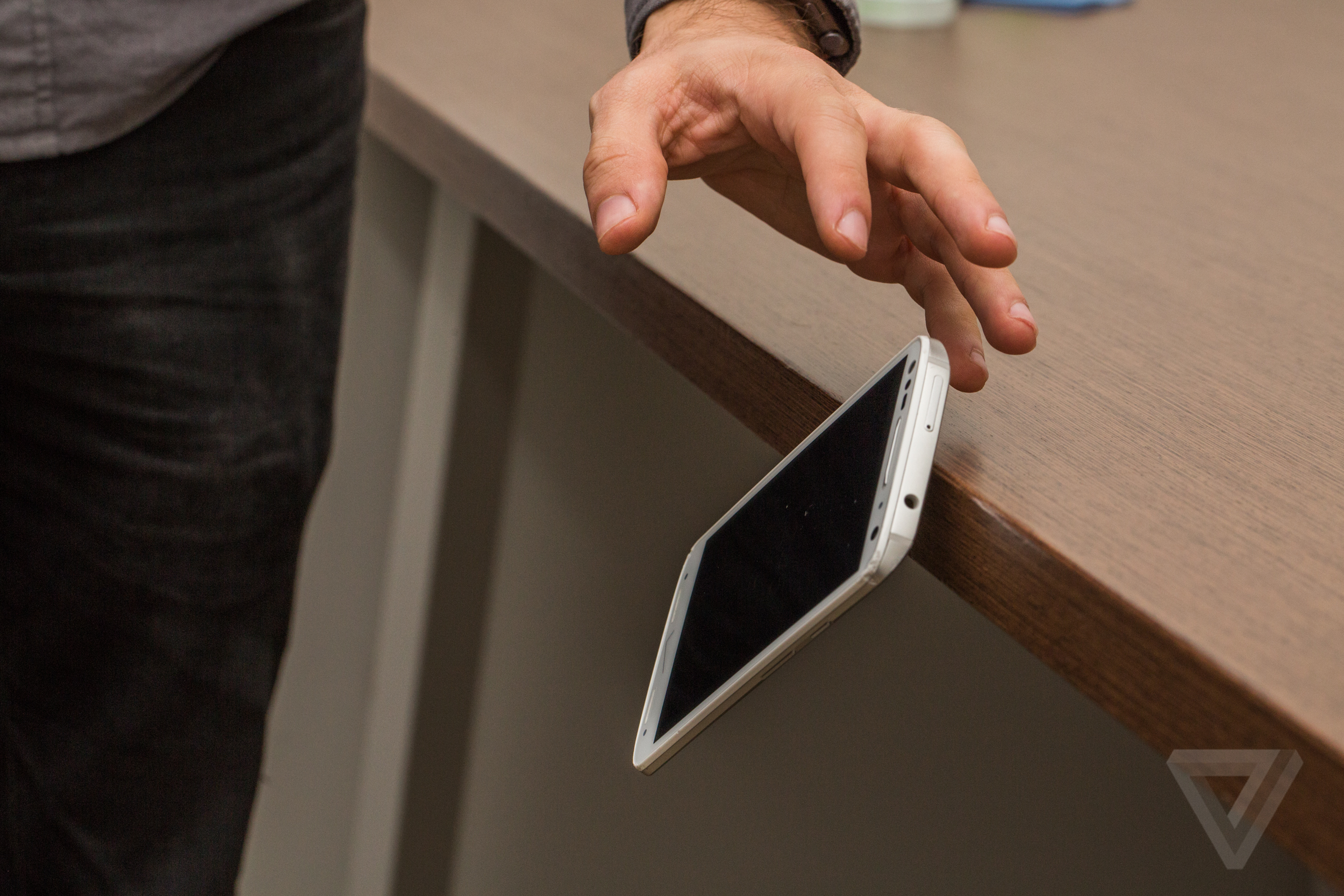
I'm biking through Brooklyn when the Droid Turbo 2 slips from my hand and smacks the pavement. For any other phone, this would be a disaster — a spiderweb of cracks across the screen, if not a totally smashed pane of glass sending tiny shards everywhere. But this is the Droid Turbo 2, so things are different. When I pick up the phone, there isn't a single new scratch on it's screen. It's just ready to go.
The Droid Turbo 2 is the latest flagship in Motorola's Droid line for Verizon. It's an iteration on Motorola’s well-received Moto X Pure Edition and Moto X Play, with a few key changes inside and out. The most notable, of course, is that screen: Motorola says that it's created the first ever "shatterproof" smartphone display, and it's debuting on the Turbo 2. Motorola's promise is that no matter how many times you drop this phone — so long as you aren't actively trying to torture it — the Turbo 2's screen won't crack or shatter.
It's an appealing promise, especially since broken smartphone screens are among the biggest scourges of modern technology. I see people reading and playing games on cracked smartphone screens every single day on the subway. And while there are no perfect numbers on how widespread this is, the figures out there suggest broken screens are a huge problem. The research firm IBISWorld found that a quarter of all US smartphone repairs are to service broken screens; similarly, in a study on iPhones, warranty company SquareTrade found that a quarter of all people had broken their screen at some point. So surely, there ought to be interest in an unbreakable smartphone screen.
If you've seen a Motorola phone in the last two years, then you'll recognize the Turbo 2. Gone is (most of) the embarrassing robo-grunge Droid aesthetic that's plagued earlier models in the line, and in is Motorola's standard design language. Motorola basically put no extra effort into styling this thing — and that was an absolutely wonderful decision. The Turbo 2 looks and feels good. There's a plastic front rim, a thick piece of metal running around all four sides, and then a back plate that can be customized by buyers. The unit Motorola lent me has a fairly tame, textured, white back, which is nice, but not what I would have picked out. The colorful backs are much more interesting, and the white front just has too many sensors sticking out.
In the center of that is the Turbo 2's 5.4-inch display, which is really the entire story of this phone. It's a perfectly fine size, slightly smaller than the Moto X Play and slightly bigger than last year's Turbo; bezels are narrow, so it's easy enough to use (mostly) one-handed even for a person like myself with smaller hands.
THIS SCREEN REALLY DOESN'T CRACK
Motorola isn't lying when it says this screen can't be shattered. In my week with the phone, I've dropped it down flights of stairs, let it fall out of my pocket and onto the sidewalk time and again, and knocked it off of tables, chairs, and desks, all without sending a crack rippling across it. By all means, my Turbo 2 should be a mess — I've put it through more knocks and spills in a week than most phones will receive over two years — but its screen remains in impressive shape. (I tried to put the Turbo 2 through the type of falls a phone might reasonably encounter; CNN managed to put a huge dent in one by having a horse step on it.)
But note that Motorola doesn't say the Turbo 2's screen is unbreakable. It is, simply, "shatterproof," and there's a big difference between the two. While the screen has yet to shatter on the Turbo 2 I've been using, it has picked up a few small dings along the way, which hover over the display like little smudges that you can't wipe away. The screen is also extremely sensitive to scratches, picking up several after just a few minutes sharing a pocket with my keys.
THE TURBO 2 WON'T TAKE MUCH DAMAGE IN NORMAL USE
Motorola makes no promises about the Turbo 2's body holding up either, although it's done well over the course of the many drops I've put it through. The metal band around its side has scratched and chipped, and some plastic on the corners has crumpled up. It doesn't weather beautifully, but I'm impressed that it isn't in much worse shape. I suspect many other phones would be.
So yes, the Turbo 2's screen can be damaged if you keep on dropping it. But the takeaway isn’t that Motorola did an imperfect job — it’s that the Turbo 2 can take a beating and only show small signs of wear. My use of the Turbo 2 isn't going to be typical, either. Optimally, no one will ever drop this (or any other) phone. But if you do drop the Turbo 2 every once in a while, it'll more than likely come out unscathed or close to it. And though the screen can still pick up a ding or two, that's far less of an issue than a series of cracks. (Motorola will even replace the display if it does shatter or crack within four years of purchase.)

To make a screen that won't break, Motorola did two main things. First, it put a back-up touch layer above the display, since touch-sensitivity often breaks even when the screen does not. And second, it essentially built a screen protector into the phone. Rather than having a smooth layer of glass over top the display like other high-end smartphones, the Turbo 2 has two plastic layers, the topmost of which is said to be coated to protect against dents and scratches.
The use of plastic — and multiple layers of it — may be a necessity when it comes to achieving Motorola's "shatterproof" goal, but it leads to several downsides. Most notably, the Turbo 2's display isn’t as nice as those on comparable smartphones. Text appears slightly soft, and colors are somewhat dull. It really stands out when you put the Turbo 2 side by side with the Moto X Pure Edition. While the Pure Edition has a lower pixel density (both have a Quad HD resolution), it looks sharper and more vibrant. Part of that is certainly the Pure Edition’s glass cover, but you have to wonder how the Turbo 2's AMOLED display comes off duller than the Pure Edition's LCD.
THE OTHER HIGHLIGHT FEATURE IS BATTERY
While the Turbo 2 may have a worse display than the top-of-the-line Moto X, it matches it or comes out on top in other areas. The phone has a Snapdragon 810 processor, 3GB of RAM, and 32GB of base storage. It runs fast and smooth, and since it uses a mostly uncustomized version of Android Lollipop, there isn't much to complain about (once you remove Verizon's tacky wallpaper and widget, that is.).
This being a Verizon-exclusive phone, there are other unwanted additions to both software and hardware. There's a Verizon logo on the front and a Droid logo on the back; both are ugly, but I promptly forgot that both existed. There are also nearly two dozen pre-installed apps, almost half of which are from Verizon. Some of the apps you may legitimately want — like the Kindle app or, let's be real, the two Candy Crush clones — but most of it is junk that you'll want to get rid of. And, unfortunately, you'll have to if you buy this phone in the US, since it’s only sold on Verizon. People living elsewhere can avoid the nuisance and pick up a Moto X Force.
The Turbo 2 has one other standout feature: its battery. Like past Droid phones, the Turbo 2 is supposed to last for 48 hours on a single charge, and — like past Droid phones — it doesn't quite make it to that estimate. In my time with the Turbo 2, it's regularly lasted through two "days": from the morning of one day to the evening of the following day, but not quite a full 48 hours. I'd put it closer to 36-40 hours, depending on your usage. On one exceptionally heavy day of use — including at least a couple hours playing Hearthstone — I brought the battery down to 10 percent in around 14 hours.
THE TURBO 2 EASILY MAKES IT THROUGH A DAY OF HEAVY USE
That's an impressive battery life for any phone, but let it be known that "two days" is, for the most part, a useless milestone. Are you really not going to plug your phone in every other night? All that matters is that the Turbo 2 makes it through a full day of heavy use, and that's a milestone most phones don't actually meet. Motorola may overshoot a bit on battery capacity here, but I can trust that the Turbo 2 won't die when I need it most.